 Rink Rocks
Choose who does the talking
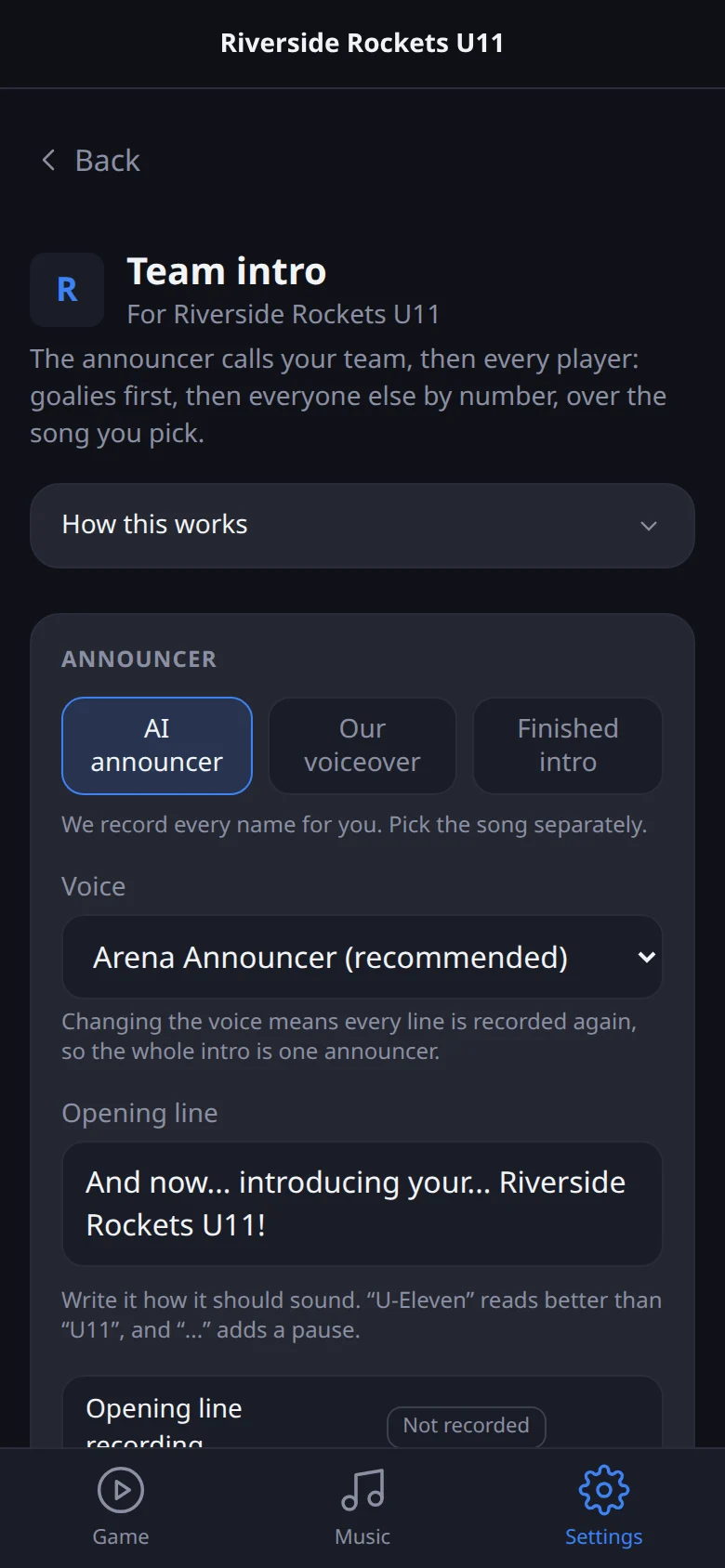
Go to Settings, tap your team, then Team intro. At the top choose:
- AI announcer: Rink Rocks records the opening line and every player's name in the same arena voice as your goal calls.
- Our voiceover: upload your own announcer's recording, voice only, and it plays over your song.
- Finished intro: upload a complete intro with the music already mixed in.
Switching never deletes anything, so you can go back.
Write the opening line and record
Type the opening line the way it should sound. "U-Eleven" comes out better than "U11", and "..." adds a pause.
Every player shows Ready, Not recorded or Changed. Tap Record and only the lines that need it get recorded.
Pick the song and the timing
Choose a song and where it starts. The sliders set how long the music plays before the announcer, how far it drops under the voice, the pause between players, and how it fades into your next song.
If singing fights the announcer, slide Clear space for the voice up. Tap Play intro to hear the whole thing.
Play it on game day
On the Game screen, the Team intro button is at the top of the Pregame tab. Tap it before puck drop. When it ends, the app switches to In-Game and your next song fades in.
Screens and video checked against the app on 2026-10-18.